The Complete SEO Build Guide
SEO stands for "search engine optimization", which is a short way of saying "getting my website found on Google without paying for an ad." This guide is a practical, step-by-step SEO playbook for building search visibility, laid out in a logical order from start to finish, in plain English. We hope you find it useful.

This is the same reference guide we work from at Fifth and Missing when building SEO for our clients. It covers everything, in the order we follow, and it's written so you can follow along whether you're handling it yourself or thinking about having someone else take it on (we know a great team!).
Google AI Overviews, those AI-written summaries that now appear at the top of many search results, have changed what "ranking well" means. Showing up first no longer guarantees a click. The goal has widened from "show up high in the list of links" to "be the source that Google and AI tools quote."
The fundamentals haven't changed though: clear, credible, well-organized content on a technically sound site, backed by real-world trust signals, is what earns citations, and it's what earned rankings in the first place. Everything in this guide reflects that.
You don't need to do most of this yourself. Each section shows three things at a glance: how long it takes, how hard it is, and who does it. This gives you a realistic view of what has to be managed by you, the business owner, and what can be handled by a company like ours (as indicated by the use of the royal "we" in sections below).
Before We Start
There are a few simple yet critical details that should be finalized before any tools come out. Everything that comes later builds on these details, so it's important to establish them right out of the gate:
- One exact name, address, and phone number. Pick the official version and write it down. It needs to appear identically in a lot of places, and even small differences (St. vs Street) can undermine Google's confidence in your online presence.
- One official web address from the start. Pick the single correct version (for example
https://www.example.com). Every other version, with or without "www," should automatically forward to it so your site doesn't compete with itself. - Access to where your domain is managed. That's typically the account where your web address was first registered (e.g. GoDaddy, NamesPro, etc.). It's not a difficult process if you've done it before but if you don't have time or the patience, we'll need access, or for you to add us as an authorized user, to configure those forwards on your behalf. We'll tell you exactly what's needed.
- A Google account. Everything Google-related connects to this, so you must have one and know the login.
One last thing: decide who you're trying to reach, and where. A local service business and a national online store are completely different and require their own approach. Trying to rank "everywhere" tends to mean ranking nowhere in particular.
Step 1: Your Google Business Profile
Your Google Business Profile is a free Google listing that puts you on the map, literally, and in local results, ideally near the top of the page, when someone searches for what you do nearby (e.g. "best cat trainer near me). If you serve customers locally, it's one of the most valuable free things Google offers, and it's where we always start. Google uses it to understand and trust your business. AI answers increasingly pull from it too.
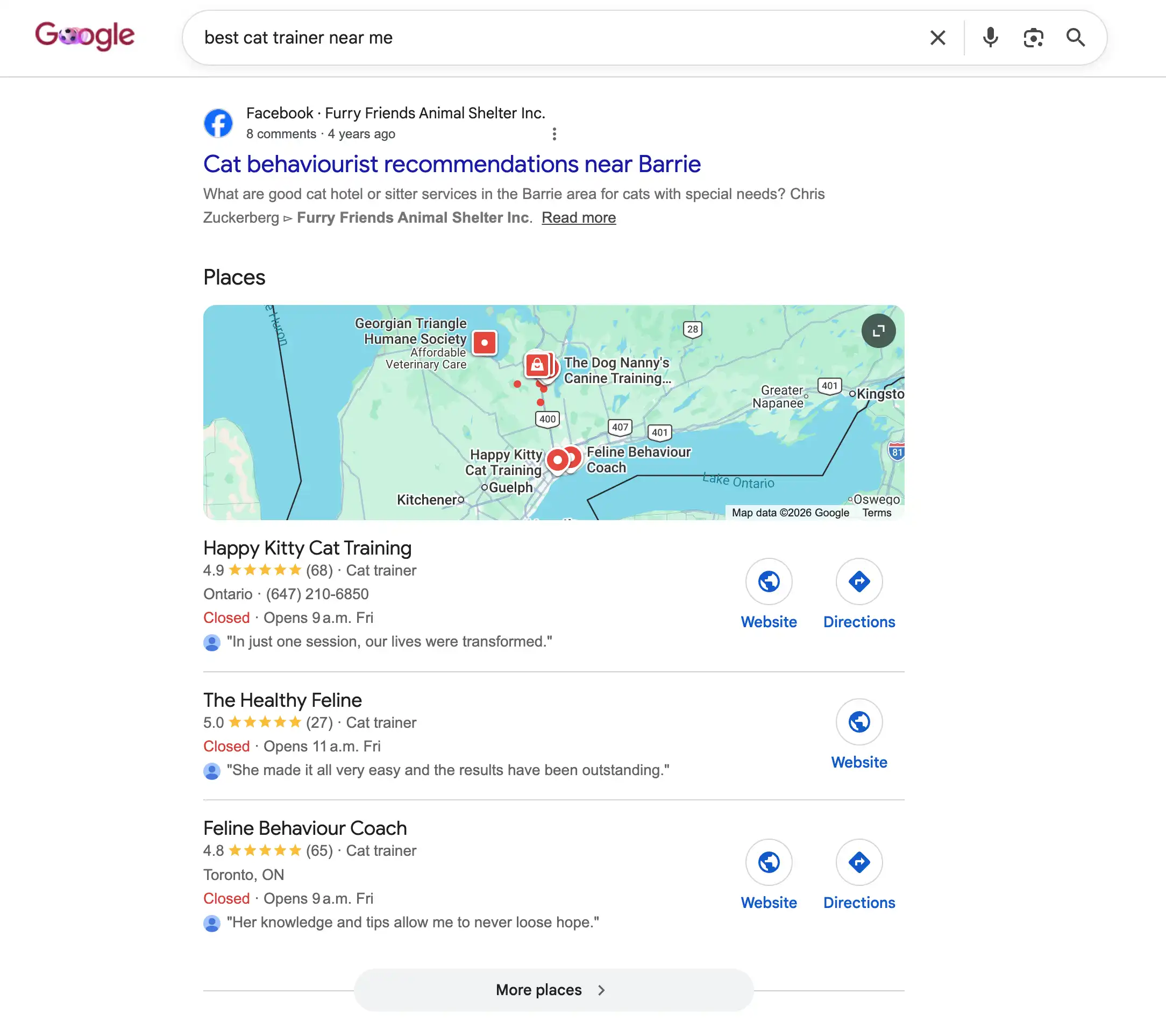 The block of local businesses with a map that shows near the top of nearby searches.
1.1 Create the listing
Google ties the listing to whoever creates it, so this first step has to be you, signed in with your Google account at google.com/business. It's quick, and we're happy to be on a call while you click through it. You'll:
- If Google already shows a listing for you, claim that one rather than creating a second. Duplicates work against you.
- Pick your main category, the one that best describes what you do. This is one of the biggest factors in how and when you show up, so you're welcome to tell us your services and we'll help you choose.
- Set your location: a street address if customers come to you, or the areas you cover if you go to them. You can keep a home address hidden and still serve a region.
- Add your phone number and website, written exactly the way they appear everywhere else.
1.2 Account Verification
Google needs to confirm the listing is really yours before it goes live. Depending on your setup, that might mean a short video, an automated phone call, an email, a text or, old school: a postcard with a code. This part needs to be done by you because Google wants the owner, not a third-party. The listing stays hidden until it's done, so don't put it off.
1.3 Add us as a User
Once it's verified, add Fifth and Missing as a user in a few clicks. You stay the owner, we just get permission to help. From here we handle the rest: filling it in, keeping it active, and making sure it keeps working for you. You can remove our access any time.
Where to find it: in the listing settings, open "People and access" (sometimes labelled "Managers"), choose Add, and enter the email we give you.
1.4 Complete Your Listing in Full
A half-finished listing is a half-finished opportunity. Once we have access, we fill in every section:
- Description. A clear summary of what you do and who you help, with your main service and location mentioned naturally.
- Services and products. Each listed with a short description so you show up for specific searches.
- Hours. Accurate, including holidays. Wrong hours are a quick way to frustrate someone who showed up when the business was closed (speaking from experience...).
- Photos. Real photos of your work, space, team, office mascot, the spider plant at reception, and products. Listings with genuine, regularly updated photos get noticeably more interest. This is the main thing we'll need from you.
- Extra details. Accessibility, payment types, parking, where applicable.
- Booking or messaging. Only turn these on if someone can respond reliably. An ignored message does more damage than no message at all.
1.5 Reviews: your strongest local signal
Reviews are one of the biggest factors in local search, and AI answers lean on them too. Getting into a few regular habits can make a real difference:
- Make it easy to ask satisfied customers. Google Business Profile gives you a simple to link to share and a QR code you can print and display in your storefront, etc.
- Never buy reviews or offer anything in exchange for them. Google catches this, and the consequences can be significant.
- Reply to every review, good or bad. On the negative ones, stay calm and helpful. Future customers read your replies as closely as the stars. We can help with responses if you want a second opinion.
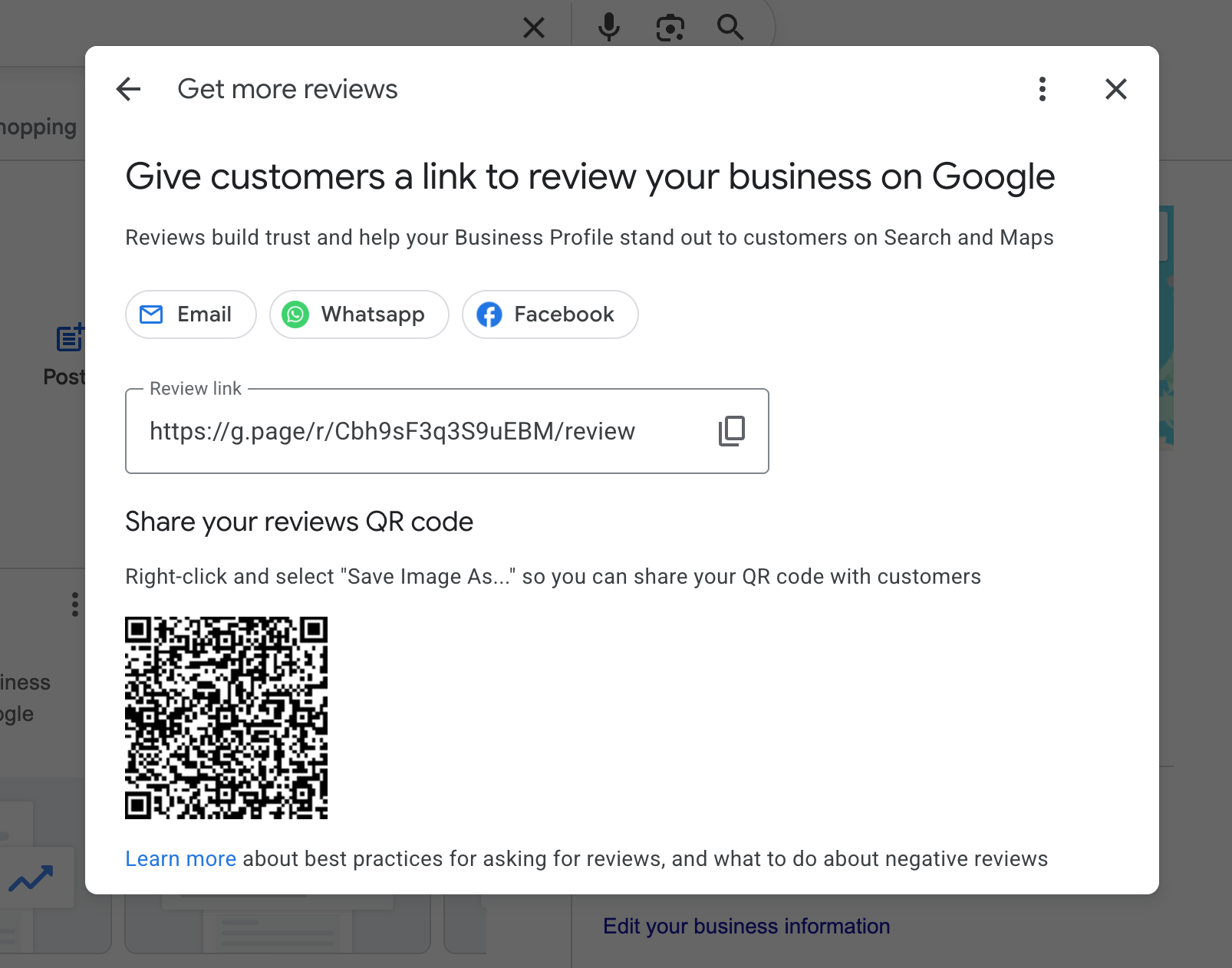 Collecting reviews made easier with a link and QR code
1.6 Keep it active
This isn't a set-and-forget listing. An hour or two a month, a post, some fresh photos, answering questions, keeping details current, tells Google your business is alive and well. We can handle this as part of ongoing care if needed.
Step 2: Google Analytics
Google Analytics is a free tool that gives you data after people land on your site: where they came from, which pages they visit, how they long they spent on your site and more. You set it up under your Google account and add us. We can handle everything after that.
Ultimately, you can't improve what you can't measure. Google Analytics tells us which pages are pulling their weight and what's turning visits into enquiries or sales. It's the difference between guessing and knowing. Because Analytics can't be used retroactively, it's important to get it setup now, so in 6 months, you won't be left wondering how many people visited your site.
2.1 Create it and add us
Same pattern as your Google listing: you set this up under the business's own Google account at analytics.google.com, then add us so we can configure it properly. You stay the owner. The setup is just a few screens: name it, enter the website address you want to track, pick your time zone and currency (changing the timezone later muddles your past data so be sure to pick the correct one). Once we're added, we're happy to take it from there.
2.2 Connect it to the site
For Analytics to collect anything, a small piece of tracking code needs to live on your website. We can add this for you, and if we designed your website or host your site, it's likely already there. We then do a quick live test afterward by opening the site and monitoring the visit appear in real time. This verifies everything's working.
realtime.webp) Screenshot of real-time analytics in Google Analytics
Screenshot of real-time analytics in Google Analytics
2.3 Set it up to measure what matters
Out of the box, it just counts visits. That's nice, but we'll tune it to count the outcomes that actually matter to your business:
- Your key actions. Form submissions, phone calls, quote requests, purchases. Measuring the real results, not just traffic.
- Filter out your own visits. We ensure you, your team and our team are all excluded from the website analytics so internal browsing doesn't skew the numbers.
- Keep more history. We turn the data-retention setting up to its maximum so we can compare over longer stretches.
- Connect Google Ads. If you run paid campaigns, we link them so everything reports in one place.
2.4 What we watch
Early on, we track a handful of things: how many people arrive from Google, which pages they land on, how engaged they are, and how often they complete those key actions. Day-to-day fluctuations are normal. The trend over weeks and months is what starts painting the larger picture.
Step 3: Google Search Console
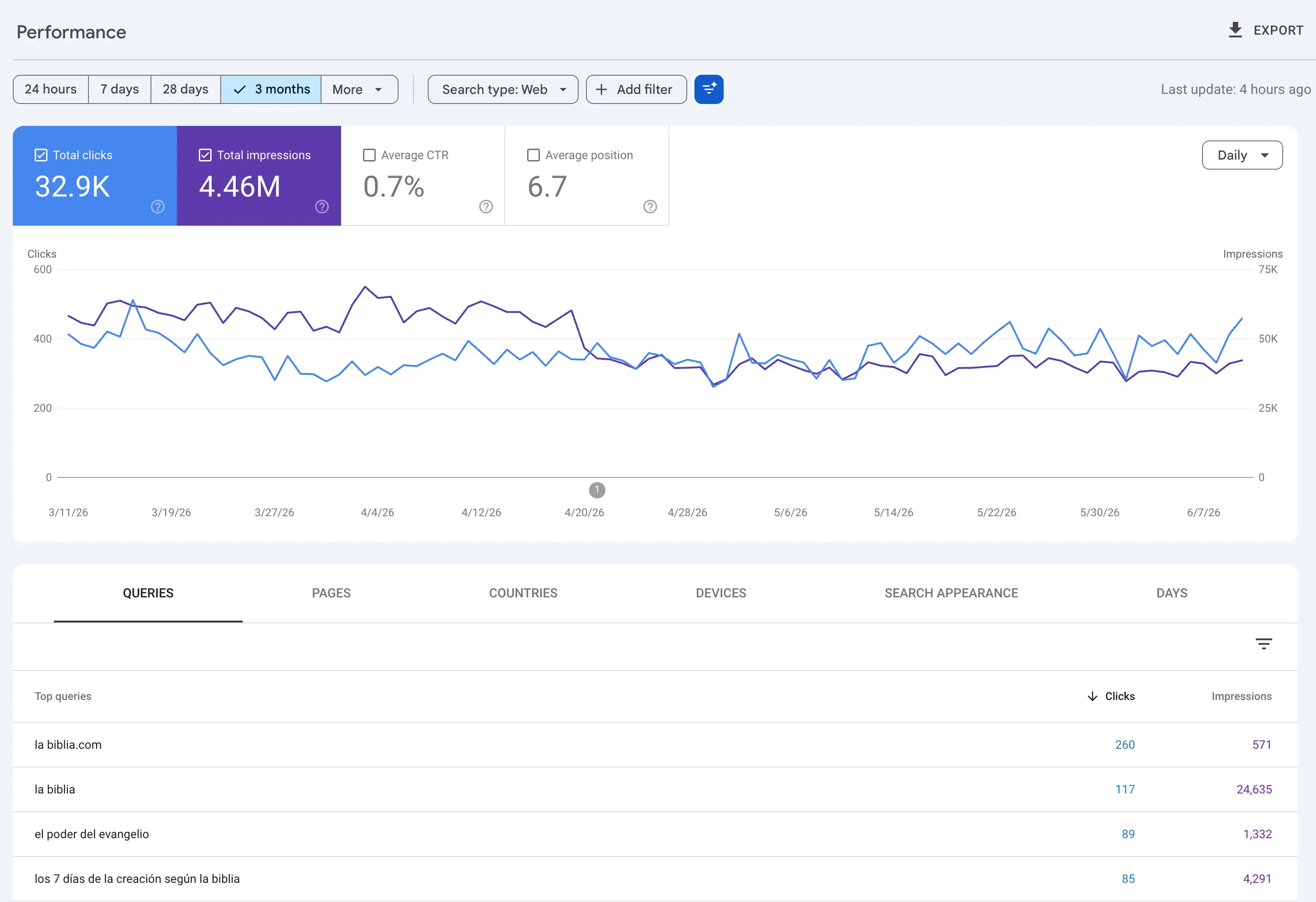
Google Search Console (GSC) is the other half of the picture. Where Analytics shows what people do on your site, Search Console shows what happens before they get there: the exact searches you appear for, how often people click, and anything that's stopping your pages from showing up. It's another great free Google tool, it lives under your Google account, and it's probably the most useful thing in the kit.
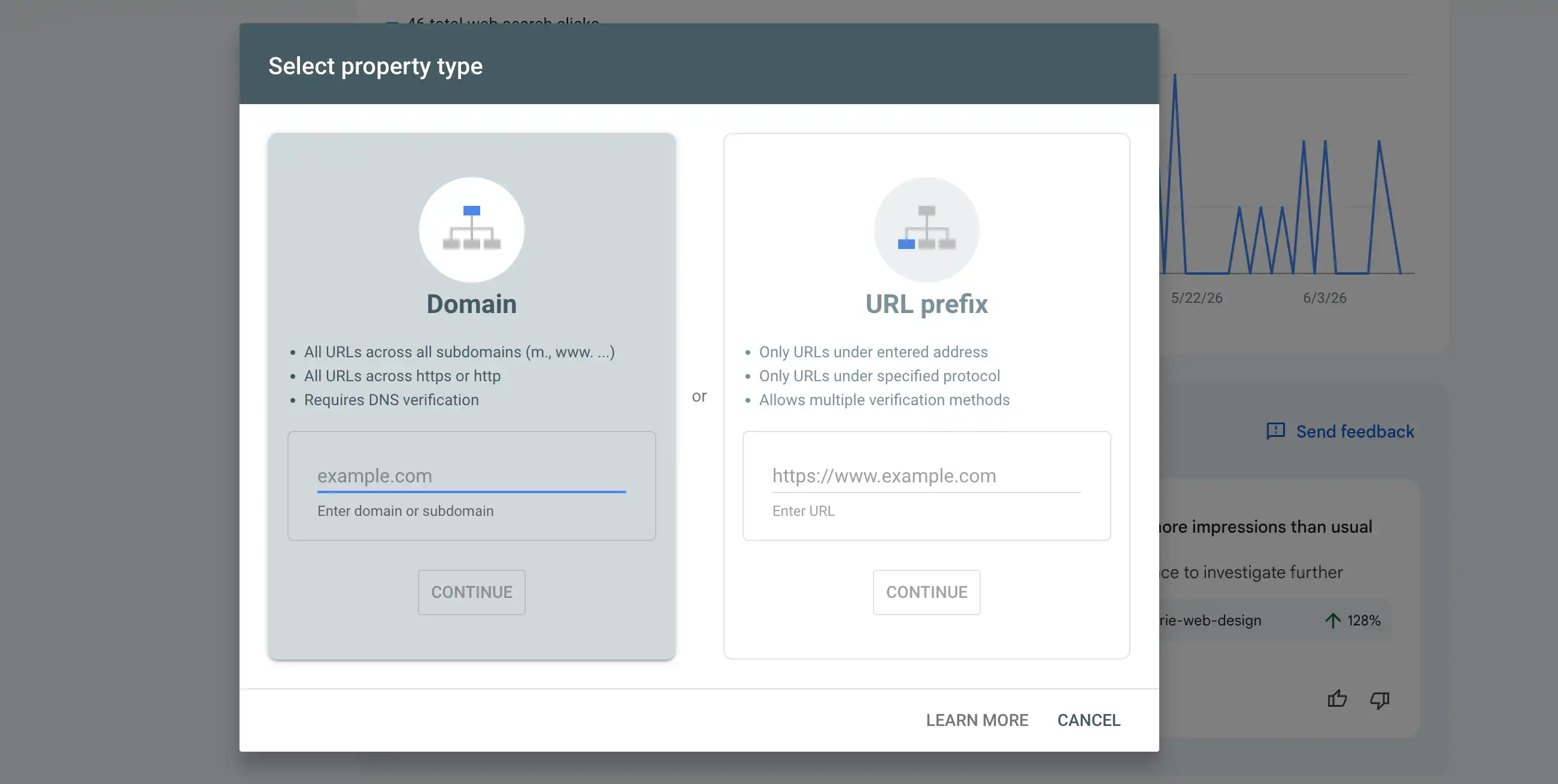
3.1 Confirm the site is yours (yep, again)
By this point, you're a pro at Google verifications. Google needs to verify we're allowed to see this data through a quick technical check. We handle that, either through the site we built or host, or by sending you one small thing to add if it lives elsewhere. Like Analytics, it sits under your Google account with us added as a user.
3.2 Give Google a map of your site
We submit a sitemap, which is just a tidy list of all the pages in your website, so Google can find and check everything rather than hoping it stumbles across each one on its own. Most sites generate this automatically. We make sure it's submitted and clean.
3.3 Connect Google Search Console to Google Analytics
We link Search Console to Analytics so the searches that brought people to your site and what they did when they got there sit side by side. Small step but genuinely useful. .
3.4 What GSC tells you
- What you rank for. The real searches you show up in, how often people click, and roughly where you rank in the search results for the keywords people use that are relevant to your business.
- What Google has (and hasn't) indexed. Indexing is the technique search engines use to organize content prior to a search. This enables Google or Bing to return responses to a search almost immediately. GSC shows which pages Google has indexed, which it's leaving out, and why, so we can fix the ones being ignored.
- Speed and mobile issues. Flagged page by page, allowing us to narrow our focus when working on a fix.
- Serious warnings. If Google ever penalizes the site or spots something suspicious, it shows up here. This is the kind of thing that can wipe out your hard earned rankings quickly, so we keep a close eye on it and have it set to alter us the moment something new appears.
Phase 4: The technical groundwork
This is the behind-the-scenes work that lets Google find your site, read it properly, and load it quickly. It's almost entirely ours to handle. If we built or host your site, we're already in a position to do this. If we didn't, we'll need access before we can get started.
Good content still won't rank well if the site is hard for Google to crawl or slow to load. We get this right once, then keep it healthy. Here's what that covers:
4.1 Making sure Google can find the right pages
We check that Google can read the pages that should show up in search, and stays out of the ones that shouldn't, like admin areas and duplicate pages. We also make sure no important page is accidentally hidden, and that two of your own pages aren't quietly competing for the same search. One wrong setting here can make a whole site disappear from Google, so we take it seriously.
4.2 A clear, logical structure
Your important pages should be a click or two from the homepage, with sensible links between related content and clean, readable web addresses. Internal linking (or cross-linking), the links between your own pages, is one of the most overlooked things you have full control over, and it helps both visitors and Google find their way around.
4.3 Speed/Load Time
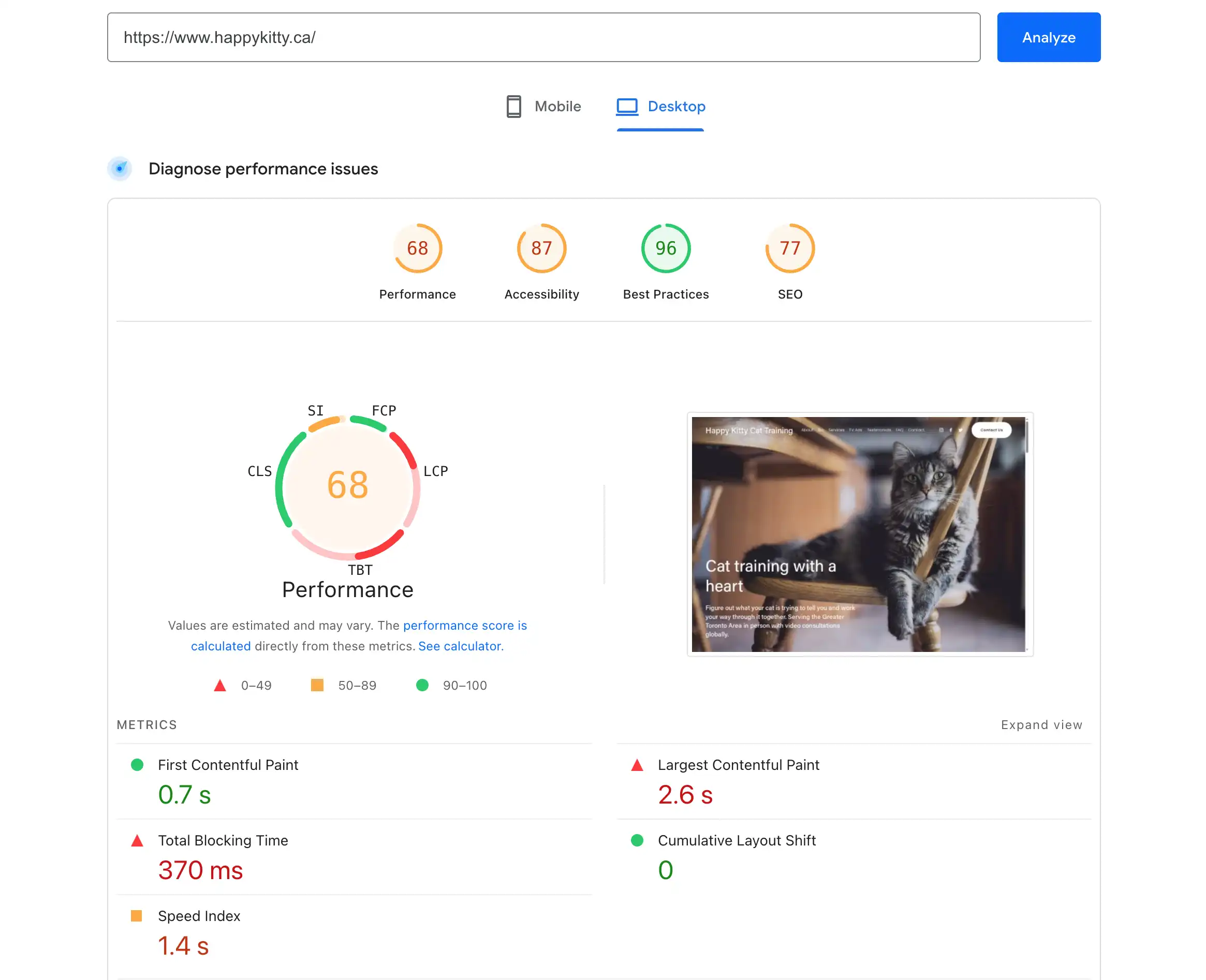
How fast a page loads, how quickly it responds when someone taps it, and whether it stays put while loading rather than jumping around, all of it affects rankings and whether visitors stick around. We get speed by compressing images, using modern file formats, loading heavy things only when needed, and trimming bloated code.
4.4 Security
Your site must load over a secure connection called HTTPS (indicated by the green padlock in the browser beside the URL). Google treats this as a basic requirement. Some hosting providers charge extra for this security. We don't.
4.5 Built for phones
Google uses the mobile version of your site as its primary reference, so if your site is hard to use on a phone you might be penalized.
4.6 What's on the page
Behind the scenes, we label what's on each page in a format that search engines and AI tools read cleanly: that this is a business, open at these hours, at this address or area and with these (hopefully glowing) reviews. Visitors never see it. Google and AI tools do, and it helps them understand exactly who you are and what you offer.
Step 5: On-page SEO
This is where each page gets shaped to match what people are actually typing into Google and to be useful when they get there.
5.1 Starting from what people actually search
Start with the words your customers use, not industry jargon. These come from the searches the site already shows up for, Google's own suggestions, and the "people also ask" questions that appear in results. Then match each search to the right kind of page: a "how do I" question wants a helpful guide, a "near me" or "buy now" search wants a service or product page.
Also worth checking: are two of your own pages competing for the same search term? It happens more often than you'd think, and it splits your ranking potential in two (this is affectionately known as "keyword cannibalizing").
5.2 Getting the details right
For each page, there are specific elements that influence how Google ranks it and how it appears in search results. Most of these are invisible to someone visiting the page. They're found in the page's code or are shaped by how the content is structured, but Google reads all of them when deciding whether to show your page and where.
- The focus of the page. Each page should be built around one clear topic or intent.
- The headline Google shows in results (meta title). Clear, specific, and written to earn the click rather than just describe the page.
- The description below it (meta description). The short summary that appears below your result in Google. A good one nudges people to click your site.
- Headings and structure. A clear main heading and sensible sub-headings in a logical order.
- An easily readable and type-able web address. Short and relevant to the page topic.
- Content that answers the question. Plain language, as thorough as it needs to be, no padding. A page that genuinely helps someone is a page Google wants to show.
- Images and links. Described images so Google knows what they show, and links between related pages so visitors can find their way around.
Step 6: Content that earns authority
In plain terms: covering your subject thoroughly enough that Google and AI tools treat you as a source worth pointing people to. Your expertise, structured and written properly.
One well-written page only gets you so far. Google and AI tools get more confident in a site when it covers a subject properly and consistently over time.
Cover a subject in depth. A strong main page on a core topic, backed by pages answering each related question, all linked together, tells Google you know your subject. It also gives AI tools a solid body of material to draw from when someone asks a question you should be answering.
Show the real experience behind it. Generic, well-written content is everywhere. What's harder to fake is genuine first-hand knowledge: real examples from your own work, named authors with a bit of background, honest sources, and a clear sense of who's behind the business. Google has been increasingly direct about rewarding this, and it's the part that requires your input most. No one can write your experience for you.
Be original. Real examples, your own data, clear explanations, sharing unique industry knowledge and an actual point of view are the things that get shared and linked to. Rehashed content that covers the same ground as a hundred other pages doesn't help anyone and sinceGoogle looks at a site as a whole, a large number of thin, low-effort pages can lower its opinion of everything on the site, including the good stuff.
Keep it current. Content loses ground if it's left to go stale. Updating your best pages as things change, correcting outdated information, and refreshing examples keeps them competitive and signals to Google that the site is actively maintained.
Step 7: Off-site SEO
7.1 Links from other sites
A few links from respected, relevant websites are worth far more than hundreds of low-quality ones. You earn them by being genuinely worth linking to: useful guides, original information, real partnerships, and local or industry relationships. Bought links and spammy directories can get a site penalized, so we stay well clear of both.
7.2 Mentions without links
When another site mentions your business name without linking to you, Google still picks it up as a sign that your business is known and relevant. A mention in a local publication, an industry roundup, or a trusted directory has value even without a clickable link. This is also worth knowing practically: if you find a site that has mentioned you but not linked to you, a polite request to add the link often works, since they have already decided you are worth referencing.
7.3 Consistent business details everywhere
This was covered in Step 2, but it bears repeating here. Your name, address, and phone number should appear exactly the same across maps, directories, and industry listings. Mismatched details confuse Google and chip away at trust, and it matters more now that AI tools cross-check business information across sources.
7.4 A recognisable presence
Complete social and profile pages, clearly tied to your business, help Google understand that you are a real, established operation. "Best of" lists, coverage in trusted publications, and mentions across your industry all contribute to the same picture. You can keep an eye on who is linking to you at any time through Search Console, under the Links section.
Step 8: Local SEO
If you serve customers in a specific area, showing up in the local map results comes down to three things:
- Relevance. How well your Google listing and website match what someone searched for. This is the factor you have the most control over, which is why getting your categories, service descriptions, and page content right matters so much.
- Distance. How close you are to the person searching. This one is fixed, but making sure your service area is configured correctly means Google at least knows where you operate.
- Reputation. Your reviews, how many, how recent, how good, and whether you reply, along with your listings around the web and links to your site.
The practical work involves area-specific pages written with genuine local detail, consistent business information across every directory, and locally relevant links where they can be earned. A page that simply swaps a town name into a generic template fools nobody, least of all Google. Keep the Google listing active and the reviews coming in, and the three factors above take care of themselves over time.
Step 9: Showing up in AI answers
AI tools like Google's AI Overviews, ChatGPT, Perplexity, and Gemini increasingly sit above the normal search results, summarizing a topic and crediting a handful of sources. Getting your business referenced by them is sometimes called GEO, short for generative engine optimization. The name is new. The work behind it is not.
There is no separate GEO project or package. What earns you a place in AI answers is the same thing that earns you a place in regular search: clear, credible, well-structured content on a technically sound site. The steps before this one are what get you there. This step is about understanding what AI tools specifically respond to, and adjusting accordingly.
What tends to get quoted:
- A direct answer first, then the detail. AI tools pull short, self-contained passages. A page that buries its point under three paragraphs of preamble is harder to quote than one that leads with the answer.
- Clean structure. Descriptive headings, logical flow, and content written the way people actually ask questions all make a page easier for AI to read and reference.
- Real, checkable authority. Named authors, honest sources, original information, and a clear sense of who is behind the business. AI tools prefer sources they can stand behind.
- Behind-the-scenes labelling. The structured markup covered in Step 4 helps machines understand exactly what a page is about and who it belongs to.
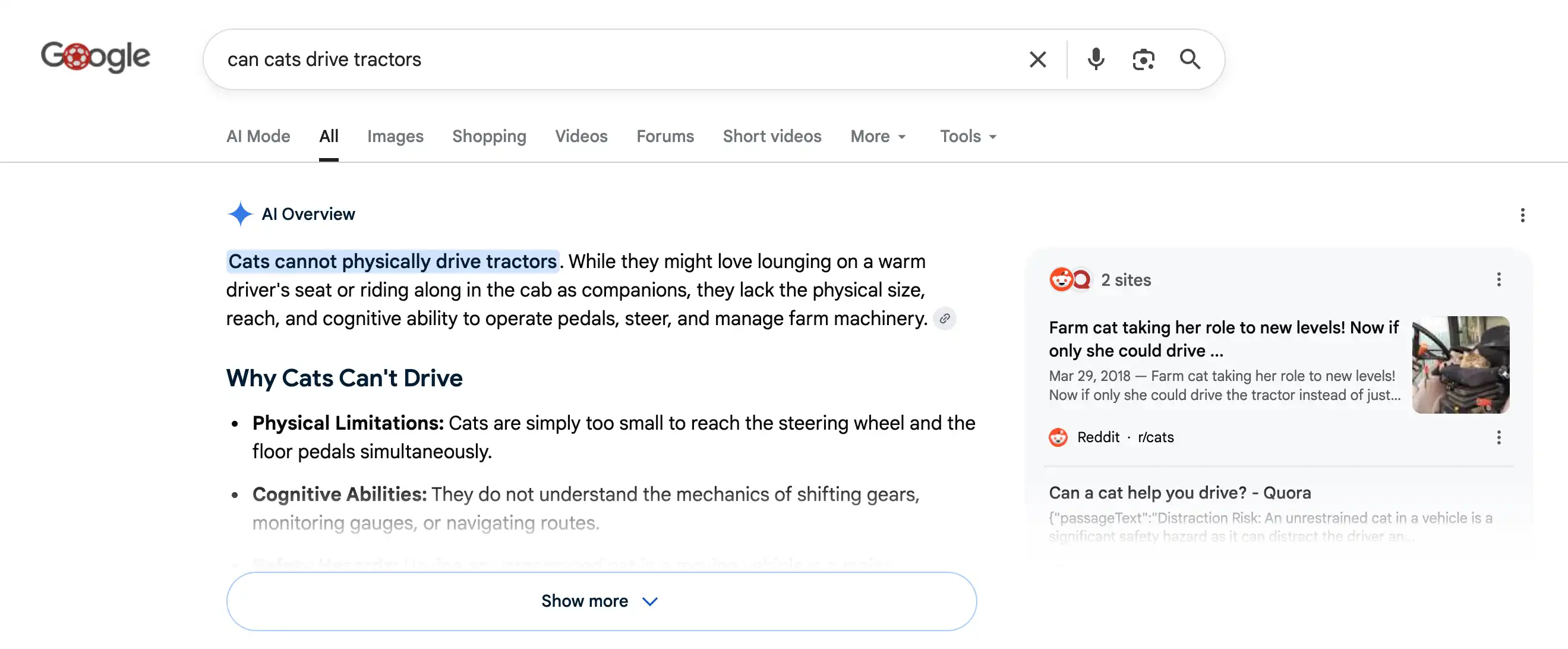
One thing worth remembering: on straightforward informational searches, AI answers often give the reader what they need without them ever clicking through to your site. So the measure of success shifts slightly. Appearing in an AI answer is still valuable visibility, but the clicks that matter most come from higher-intent searches, comparisons, local results, and decision-stage questions, where people still want to visit the actual site. That is where the content work in the earlier steps pays off most directly.
Step 10: Keeping it running
SEO isn't something you finish. The steps before this one build the foundation. This step is what keeps it working. Think of it less like a project and more like a car: it runs well because someone checks it regularly, not because it was built well once.
Every week
- Check Google's tools for new errors, warnings, or security flags.
- Watch for unusual drops or jumps in traffic and enquiries.
- Keep the Google Business Profile active: a post, fresh photos, and a reply to any new reviews.
Every month
- Review which searches are rising and which are slipping, and look for new opportunities to go after.
- Update existing pages, not just publish new ones. Older content loses ground if it's left alone.
- Re-check site speed and fix anything that has slipped.
- Make sure business details are still consistent across directories.
Every quarter
- A deeper technical check of the whole site.
- Revisit priorities against your business goals and any upcoming busy seasons.
- Check what competitors are doing that you aren't.
- Review how you're showing up in AI answers and adjust content where it makes sense.
How to tell it's working
Roughly in this order:
- Enquiries and sales from Google search. The real measure.
- Clicks from search, and the searches driving them. Are the right people finding you?
- Where you rank for the searches that matter, including whether you appear in AI answers.
- Local map visibility and review growth, for businesses serving a specific area.
- Technical health: site speed, pages indexed correctly, no errors sitting unaddressed.
Traffic counts and keyword tallies are fine to track, but they only mean something if they move the list above. A spike in visitors who never enquire is just a number.
The tactics shift. The principle doesn't: be the most useful, credible, clearly presented source on your subject, and make it straightforward for Google to understand that. Everything else is detail.
Google Ads
In plain terms: everything in this guide earns your place in Google over time. Google Ads rents a spot at the top right away. Different approach, same goal.
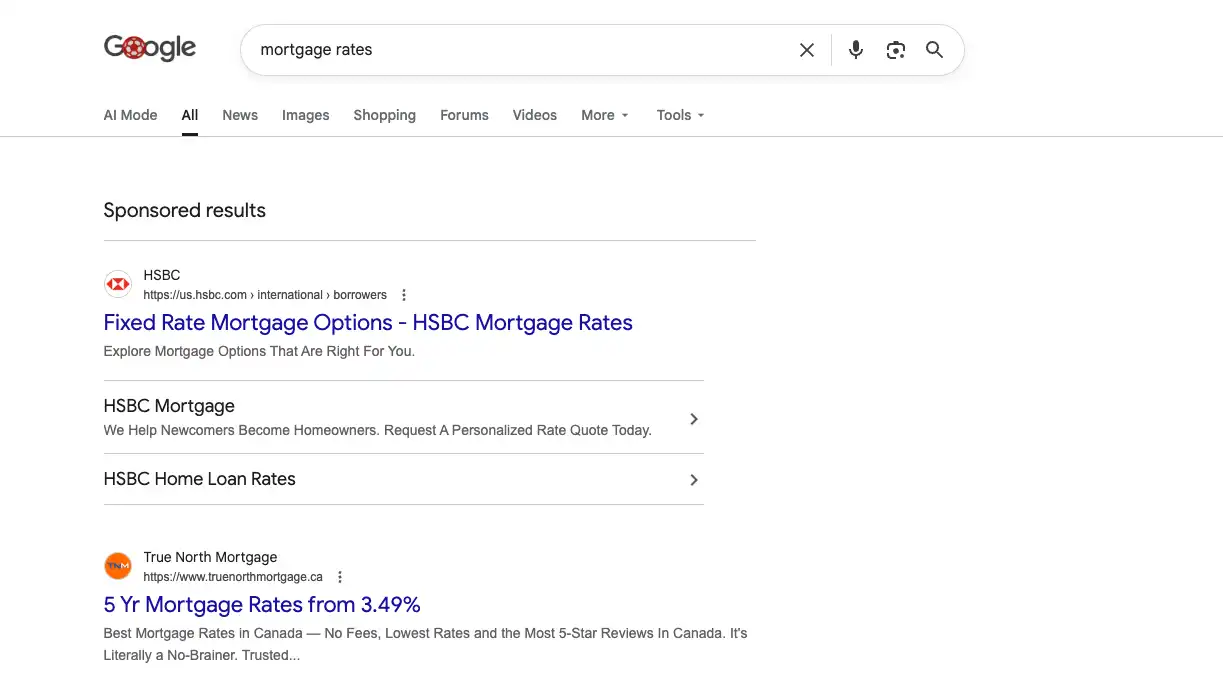
SEO and Google Ads are two different ways of showing up in search. SEO earns your place in the normal results. It takes time to build, but the clicks are free and the effect compounds. Google Ads are the results labelled "Sponsored" at the very top: you pay each time someone clicks, you can appear almost immediately, and you stop appearing the moment you stop paying. Neither is better. They do different jobs.
When ads make sense
- You need results quickly. A new site hasn't earned its rankings yet. Ads put you at the top while the SEO work builds underneath.
- Something is time-sensitive. A launch, a promotion, or a seasonal push with a hard deadline.
- The search is competitive and climbing the organic results honestly will take time.
- You want to test demand. Ads show quickly which services and wording people click on, which makes your SEO work sharper.
How they work alongside SEO
The two feed each other. Ads give you fast data on what converts, which informs your pages and content. SEO keeps growing the free traffic, so over time you can often lean on ads less. They also share the same plumbing: the Analytics and conversion tracking set up in the earlier steps measures both, so you can see what every dollar actually brings back.
What's involved
Choosing the right searches to target and the ones to avoid, writing the ads, pointing them at the right pages, setting up tracking, and tuning the campaign over time to get more for your money. Your part is straightforward: set a monthly budget you're comfortable with and tell us what a good lead or sale is worth to you. The ad spend goes straight to Google.
Want us to run this for you?
This is the framework behind our SEO services. If you'd rather hand it off than do it yourself, get in touch. Our pricing page has all the details.